
32 Understanding the Financial Management Document
MANAGING FILES
- Campus Upload Area
- To locate your Financial Management document from the link above, select your campus folder > Financial Management folder > (year) folder > (campus) Financial Management excel document.
- Please do not download and edit this document offline. Instead you are asked to work from the live document to ensure we always have one source of truth for financial reporting.
Saving vs Live Editing
It is important to live edit the document on Sharepoint to be sure that your financial recording and updates are constantly shared with Student Life for monthly financial reviews.
- There are two ways to open and edit the Financial Management document.
- Whichever you choose, ensure the autosave is on to make sure your updates are reaching Student Life.
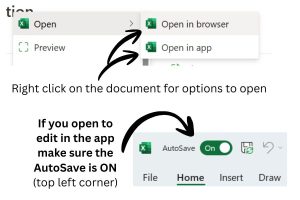
- To live edit in the Excel App, right click on the document link in Sharepoint and select “Open in app.”
- If you open to edit in the app, make sure the Autosave is ON. Autosave button is located in the top left corner of the window.
- If you open in browser, your changes will automatically be live saved.