54 SA Marketing & Communications
REQUIRED READING
There are several ways to promote what your team has planned for events and services. Using the content that you have created to promote them, we recommend advertising across as many platforms as your Student Association has access to.
Approved marketing platforms
- Outlook email (emails from sa.campus@nscc.ca)
- Microsoft Teams (chats and channels)
- campus screens
- Student Association bulletin boards
- word of mouth / information booths
- office hours / student lounge
- Students’ Council meetings
NSCC Student Associations do NOT use Tiktok, Snapchat, Whatsapp or Twitter to conduct business.
Weekly e-mail Newsletters
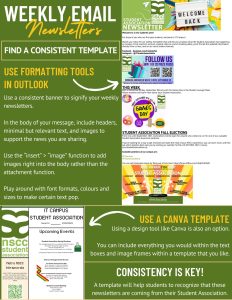
The Student Association may send one (1) all student email each week. Use this wisely and develop a newsletter template that will allow students to recognize and expect your emails.
Formatting tools in Outlook
Use a consistent banner to signify your weekly newsletters. In the body of your message, including headers, minimal but relevant text, and images to support the news you are sharing. Use the insert then image function to add images right into the body rather than the attachment function. Play around with fonts, formats, colours and sizes to make certain text pop.
Templates
Use a Canva template using a design tool like Canva is also an option. You can include everything you would within the text boxes and image frame within a template that you like. Consistency is key! A template will help students to recognize that these newsletters are coming from their Student Association.
What to include in weekly newsletters
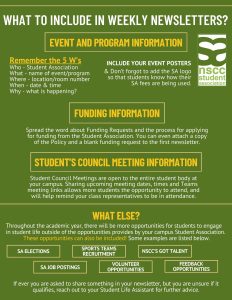
Event and Program information, funding information, students’ council meeting information. What else may apply? SA elections information, sports team recruitment, nscc’s got talent, SA job postings, volunteer and feedback opportunities. If ever you are asked to share something in your newsletter, but you are unsure of it qualifies, reach out to your Student Life Assistant for further advice.
Social Media – Facebook & Instagram
You can post your content for immediate publishing by uploading your content to your Student Association’s Facebook or Instagram page.
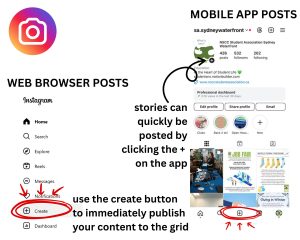
Instagram – Use the “create” button to immediately publish your content to the grid, stories can be quickly added by clicking the “+” on the app.
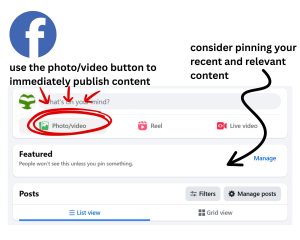
Facebook – Use the “photo/video” button to immediately publish content, consider pinning your recent and relevant content.
You can also use Meta’s Planner to schedule your Facebook and Instagram posts. This requires either PNG or JPG files and accompanying text. Though you may add links to your accompanying text, it is important to note that these two platforms do not support clickable links on posts.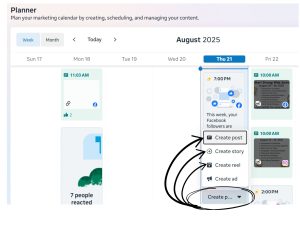
To schedule posts, click the “create post” icon in your planner, on the day you want to schedule your post for. You can then schedule a post, story or reel.
Social Media Engagement & Contests
To increase the engagement of your campus’ current student population, consider running a “follow contest” by promoting your social media pages and offering prizes or one grand prize where any new followers to your page would be eligible to win. Winners should be asked to confirm their W# via a private message on the platform.
Consider also Running a Scavenger Hunt through your Social Media Platforms as a means to increase your current student followers.
social media posts are permanent to your page or grid.
social media stories appear at the top of the platform and are visible for 24 hours after posting.
You may find stories that have expired in your account archives.
short video